- Impex
- Documentation
- A manual for the receipt printer
General
The printer queue is cleared every week when the Impex USB Protect reboots. Any jobs queued while the printer was off or disconnected will be lost. If this happens, the scan report and the files CSV report can be reprinted from the ICC GUI.
Turn the printer off for at least 15 minutes once per quarter to allow it to cool down and reset.
Loading paper
Before you start: The paper gauges inside the printer are fragile. If they become detached you will need to disassemble the printer to reattach them. Handle the paper roll carefully when inserting it.
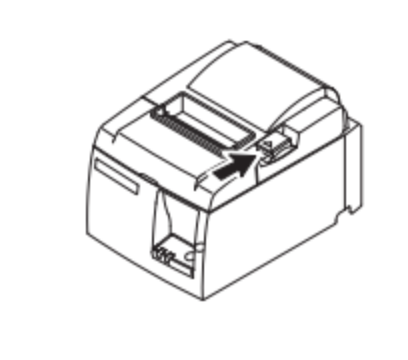
- Press the open lever on the cover of the printer.
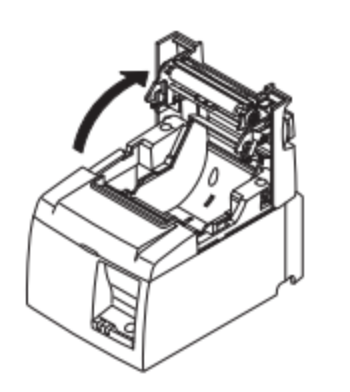
- Orient the roll so that the paper feeds from underneath (the same way you would hang a roll of toilet paper under, not over). Pull the leading edge of the paper out so it hangs free from the front of the printer.
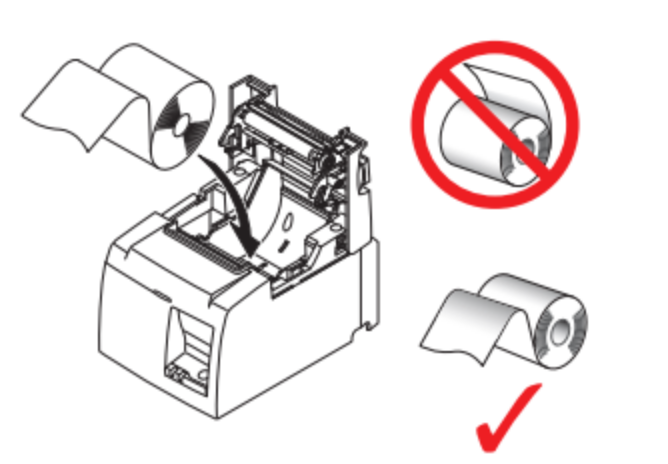
- Gently push the roll into place until it touches the lower black button. If the roll does not depress the lower button, the error light will flash — recheck the roll position before closing the cover.
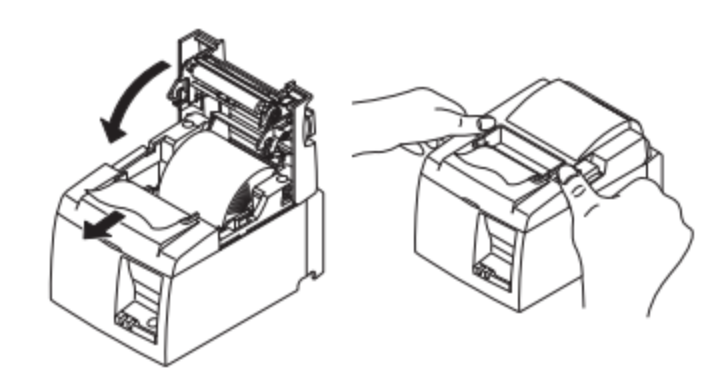
- With the paper feed hanging out the front of the printer, close the cover by pushing it down firmly until it clicks. Do not try to thread the paper through the front rollers manually; closing the cover seats the paper automatically.
Troubleshooting
Error light is flashing
The error light flashes when the paper roll is not seated correctly.
- Open the cover and check that the roll is pushed all the way down so it depresses the lower black button.
- Confirm the paper feeds from underneath the roll, not over the top.
- Close the cover and check whether the error light clears.
Run a feed self-test
Use this test to verify the printer is functioning correctly.
- Unplug the printer from the USB port.
- Hold down the Feed button on the front of the printer.
- While holding the Feed button, plug the printer back into the USB port.
- Release the Feed button once the printer starts printing.
- If a receipt listing the printer settings is printed, the printer is working correctly.